
Your TouchDesigner show
keeps running.
TDXCardio launches your .toe, listens to its heartbeat, and restarts it when it crashes, freezes or runs unhealthy. Every restart leaves a screenshot, a log entry and, if you want, an email.

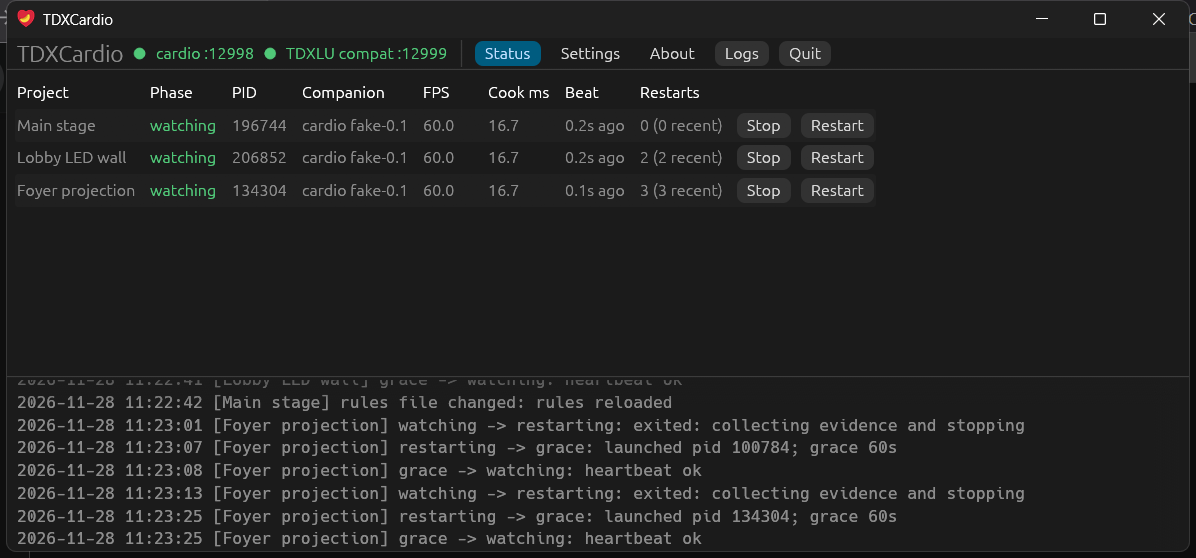
Three ways a show goes down, and what TDXCardio does about each
The Cardio component inside your project sends a heartbeat every second. The app watches that and TouchDesigner's process, so it knows the difference between a crash, a freeze and a show that is merely struggling.
TouchDesigner quits
TDXCardio watches the process itself, so a crash is caught in about a second, not after a heartbeat timeout. TD is relaunched straight away.
TouchDesigner hangs
The process is alive but the heartbeat stops. After the timeout (30 s by default) it takes a screenshot of the stuck frame, kills TD and relaunches it.
TouchDesigner struggles
Optional health rules: fps under a floor or frames over a cook-time budget for long enough. Log it, or restart, gracefully if TD can still answer.
What a restart looks like
- CaughtExit, stall or an unhealthy stretch. The phase on the Status page changes, and the log says which.
- EvidenceA screenshot into
captures/, a line in the day's log, an email if you set one up. - Graceful quitIf TD can still answer, it is asked to quit, and optionally save, before anything is killed.
- RelaunchAfter a short delay that doubles on each restart in the window, capped at 60 s.
- WatchingHeartbeats return, the phase goes green, and the restart is counted.
If a show keeps falling over (5 restarts in 10 minutes by default), TDXCardio stops trying, marks it gave_up and emails you, instead of thrashing all night. It can also reboot the machine after a give-up, if you ask it to.
Built for shows nobody is sitting next to
Where a TouchDesigner project runs for days without an operator, the watchdog is the operator.
Permanent installations
A museum piece, a lobby wall, a retail window that runs every day. TDXCardio starts with the machine, opens the perform window, and brings the show back after a crash before anyone notices.
- Start with TDXCardio
- Perform mode
- Reboot after give-up
Live events and touring shows
When a cue loads 40 GB of media, the project asks for a hold so the stall is not mistaken for a freeze. When a restart is needed, TD is asked to save and quit cleanly first.
- Hold / Release
- Graceful restart
- Keep focus
Several shows on one machine
A media server running a main stage, a lobby wall and a foyer loop as separate projects. Each is watched on its own, with its own rules, on one Status page.
- Several projects
- Per-project rules
- Launch or attach
Remote and unattended sites
You are not on site, but you get an email with a screenshot when a show restarts or gives up. status.json, rewritten every second, feeds your own dashboard or monitoring.
- Email alerts
- Screenshots
- status.json
Teams and show files in git
A show's rules live in Show.cardio.json beside Show.toe. Commit it, and every machine that runs the show watches it the same way. Rules reload within 2 s after a git pull.
- Rules travel with the project
- Live reload
Long renders and soak tests
Leave a long export or an overnight soak running. If TD falls over at 3 a.m., the log and the screenshot say when and how, and the project is already back up.
- Daily logs
- Health rules
- Restart limits
Every rule in one window, with a tooltip on each
Add a project with + Add project…, or just open it in TouchDesigner and tick it when it shows up in the list. Each project page says which file it saves to.
- This machine (
cardio.json): the.toepath, launch or attach, which TD build, email. - The project (
Show.cardio.json): timeouts, restart limits, graceful restart, health, window and evidence. - Save applies immediately and never restarts TouchDesigner.
- A rules file that fails to parse keeps the previous rules and says so. It never falls back to defaults behind your back.
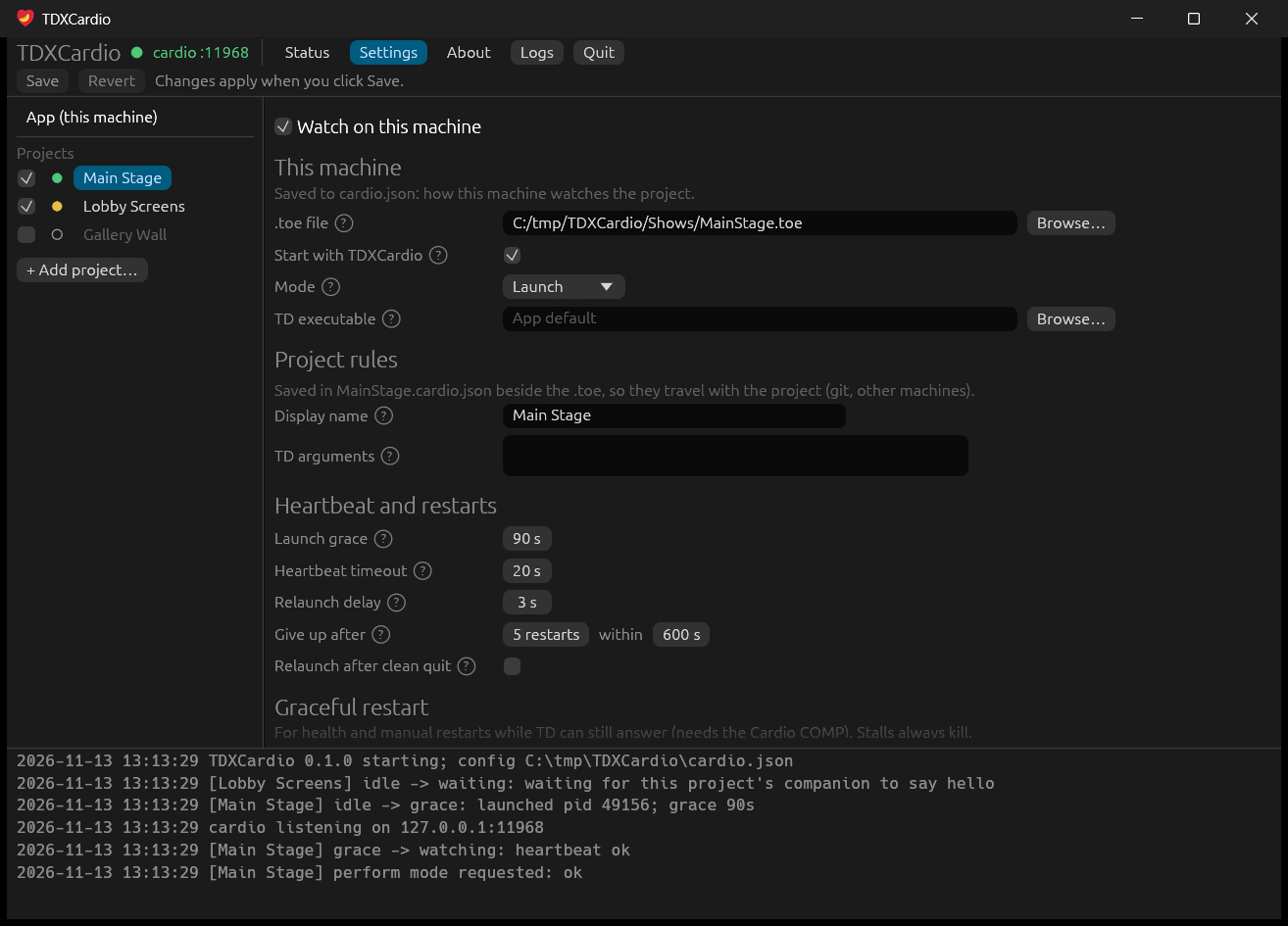
One component, dropped anywhere in the project
Cardio.tox sends the heartbeat: fps, frame cook time, dropped frames and perform mode. It also takes commands back, so TDXCardio can ask it to save, quit or open the perform window.
The project can see that it is watched: TDXCardio fills in the Status page parameters, so your own logic can read the watch phase and the restart count.
| Cardio | Active, Port (11998), Heartbeat Interval, Watch ID Override, Hold / Hold Seconds / Release |
|---|---|
| Status | Connected, Watch Phase, Restarts |
| About | Repository link and license |
# Loading media, a heavy render, a big rebuild:
# ask for a pause so the stall is not called a freeze.
op('Cardio').Hold(300, 'loading 40 GB of media')

# ...and when it is done:
op('Cardio').Release()
{
  "name": "Main show",
  "timeout_secs": 30,
  "max_restarts": 5, "restart_window_secs": 600,
  "graceful": { "enabled": true, "save": false },
  "health":   { "enabled": true, "min_fps": 20, "bad_secs": 30, "action": "restart" },
  "window":   { "perform_mode": true, "keep_perform": true },
  "evidence": { "screenshot": true, "email_on_gave_up": true }
}
Everything it does
status.json, rewritten every second, for dashboards and monitoring.--headless runs it without a window or tray, for service-style setups.Same watchdog, inside the launcher
TDX Launcher Ultra's TDXCardio panel is built on the same engine, with the same Show.cardio.json rules. Use whichever app fits the machine; a project is watched the same way in both. TDXCardio is the small, standalone one for show machines.
Download
Free, open source and MIT licensed. Run the app, drop Cardio.tox into your project and save, then tick the project in Settings. The Status page shows it as watching once heartbeats arrive.
Windows
TDXCardio.exe. One file, no installer. It sits in the tray.
macOS
TDXCardio-macos.zip, a universal app for Apple Silicon and Intel. It sits in the menu bar.
Cardio.tox
The TouchDesigner component. Drop it anywhere in your project and save. It comes with every release.
Get Cardio.tox Release notes and older versions on Releases; source and issues on GitHub.Questions
Does it work without the Cardio component?
It can launch TD and catch a crash from the process alone, but freeze detection, health rules, hold and graceful restarts all need the heartbeat, so add Cardio.tox. A project that already has TDX Launcher Ultra's TDXLauncherUtility with its heartbeat on is heard too.
Will saving a setting restart my show?
No. Saves apply immediately and never restart TouchDesigner. Only port and data-folder changes need a TDXCardio restart, and the save message says so.
What happens to TouchDesigner when I quit TDXCardio?
Nothing. Quit stops watching and leaves TouchDesigner running.
Can it watch a project I open by hand?
Yes. In launch mode it adopts a running session of the same project when its component is already talking. In attach mode it never starts TD itself, and relaunches only after the session dies or stalls.
Which TouchDesigner build does it start?
The newest install it finds, unless you pick one for the machine or for a single project.
What does macOS need?
Screenshots need Screen Recording permission, and Keep focus needs permission to control System Events. macOS asks the first time each is used.
More from Function Store
Tools for TouchDesigner, from workflow to show control.